
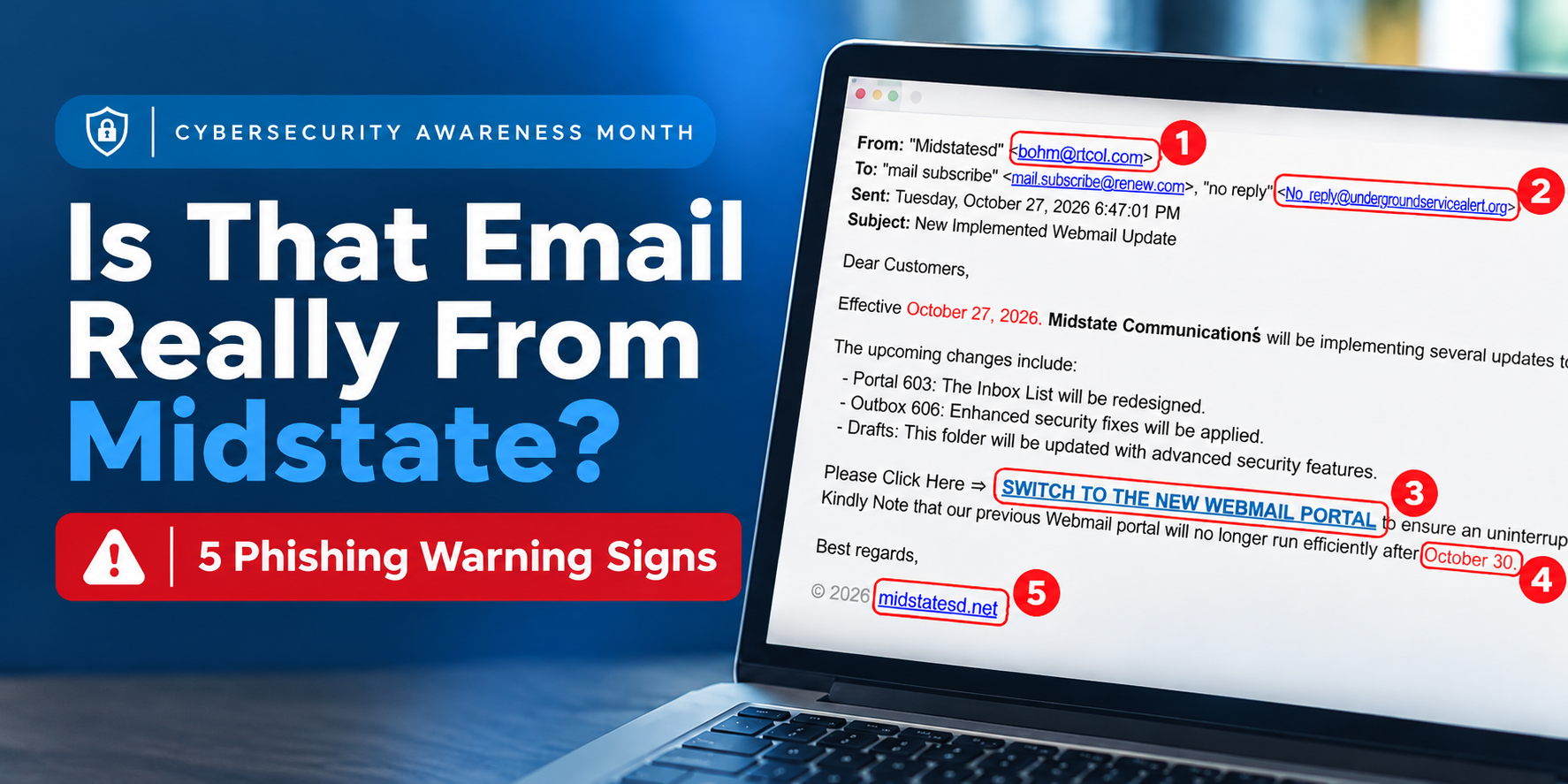
Is That Email Really From Midstate?
– By #Midstate IT Team
Sometimes the best way to learn how to protect yourself online is to look at a real example of what NOT to trust. Recently, one of our Midstate Communications customers received an email claiming that changes were being made to their Midstate email account.
The problem? This email did NOT come from Midstate Communications.
It looked somewhat official, mentioned security updates, and encouraged the customer to click a link to switch to a new webmail portal. It was a phishing attempt designed to trick the recipient into visiting a suspicious website.
How Can You Tell If an Email From Midstate Is Fake?
There are five warning signs to look for: an unfamiliar sender's email address, unusual recipient addresses, suspicious links, urgent deadlines, and missing contact information. One warning sign alone may not mean an email is fraudulent, but several together are a good reason to stop and investigate.
Let's take a closer look at the actual email our customer received.
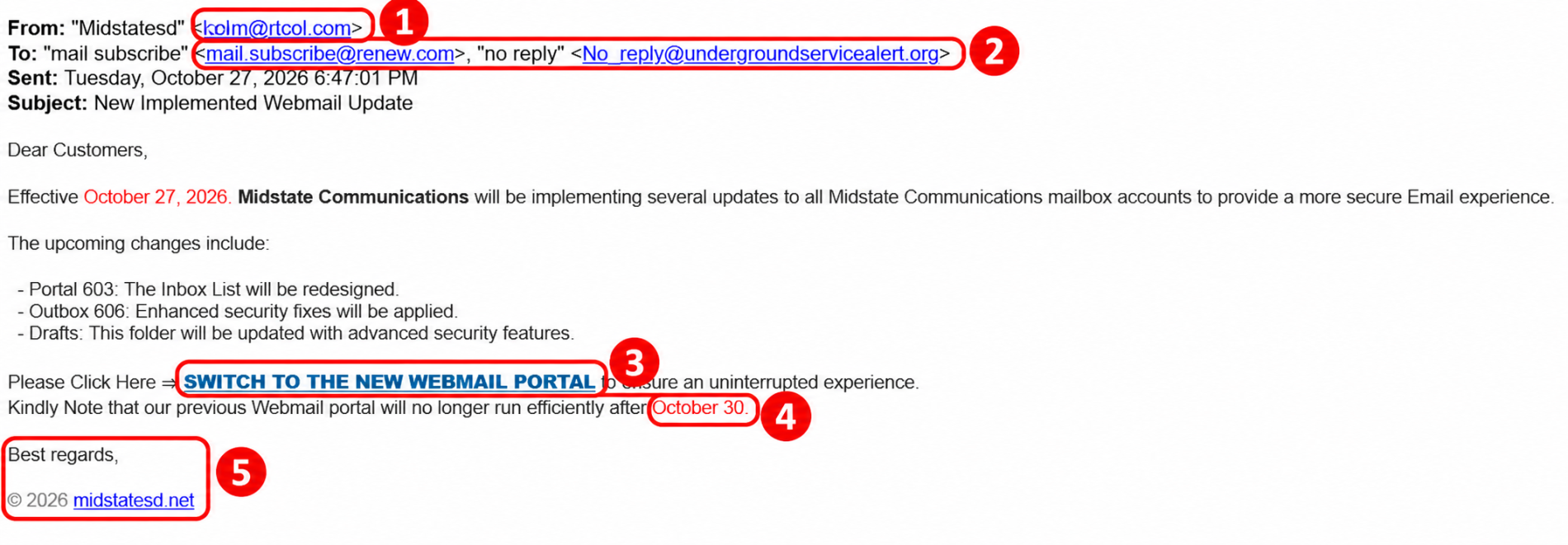
1. Look at the Sender's Email Address
The email displayed "Midstatesd" as the sender, but the actual email address was ohm@rtcol.com. That's not a Midstate Communications email address!
Scammers can make the sender's name look familiar, so always check the actual email address, not just the name displayed.
2. Check Who the Email Was Sent To
The "To" field contained unrelated email addresses instead of the customer's own address. That's another reason to be suspicious.
While legitimate emails can sometimes show different recipients, an unfamiliar address combined with other warning signs should make you cautious.
3. Be Careful with Links
The email included a prominent link reading "SWITCH TO THE NEW WEBMAIL PORTAL."
This is where phishing emails can become dangerous. A link may take you to a fake website designed to look like a legitimate login page. If you enter your username and password, those credentials could end up in a scammer's hands.
Don't click a suspicious link. Instead, visit the company's website using an address you already know or contact the company directly.
4. Watch for Urgent Deadlines
This email claimed that the customer's current webmail portal would stop working properly after October 30.
Scammers frequently create a sense of urgency to pressure people into acting before they have time to think. When an email tells you to act immediately or risk losing access to something, stop and verify the information first.
5. Look for Legitimate Contact Information
Notice that the email ended with a generic signature and no Midstate phone number or office contact information.
Although missing contact information alone doesn't prove an email is fraudulent, it is another warning sign when combined with everything else we've identified.
What Should You Do If You Receive a Suspicious Email?
When you put these five clues together, it's clear this message should not be trusted. Delete it without clicking the link or providing any personal information.
Not every scam email will be this easy to recognize. Some are extremely convincing, with professional graphics, familiar logos, and nearly perfect wording.
That's why the Midstate IT department encourages everyone to develop one simple habit:
PAUSE BEFORE YOU CLICK!
Ask yourself: Does this email make sense? Was I expecting it? Is the sender legitimate? Should I call and verify before clicking?
Frequently Asked Questions About Email Scams
Does Midstate Communications ask customers for their email passwords?
No. Midstate Communications will never request your password or login credentials through an email. If you receive such a request, do not respond or click any links. Call or text 605-778-6221 to verify the message.
What should I do if I clicked a suspicious email link?
If you clicked a suspicious link, don't enter any personal information. If you already entered your username or password, change your password immediately through the legitimate website and contact Midstate Communications for assistance. If you use that same password for other accounts, change those passwords, too.
We're Here to Help Keep You Safe
As your local communications provider serving communities throughout south-central South Dakota, Midstate Communications is committed to helping our customers stay connected and safe online.
Cybersecurity doesn't have to be complicated. Sometimes, taking a few extra seconds to question an unexpected email is all it takes to avoid becoming a victim.
Not sure if an email is legitimate? Before you click, call or text Midstate Communications at 605-778-6221.
We're always happy to help!
Last Modified:

